When great dance moves turn into a dance of despair,
can AI fix it?
Across four levels of testing, AI could dance to music, connect key poses, and transfer a dance to another character; I still could not fix the strange motion capture movements this time.
Where it started: a Short comparing the anime with hand-drawn animation
Test dates: October 6–9, 2026. Models used: Grok Imagine, MiniMax H3, Seedance 2.5, Wan Animate 2, SCAIL-2, SAM 3D Body, and SeedVR2. I used GPT to generate the character images for the final round. H3, Wan, and SCAIL-2 ran on one RTX 3090; Grok and Seedance ran in the cloud. These models change quickly, so the conclusions below apply to the versions available on those days. Every video is labeled with the model and method used.
Wandance (ワンダンス; titled 《絕妙舞步》, “Superb Dance Steps,” in Taiwan) is a manga about high school street dancers. It was adapted into an anime in fall 2025. The anime’s dance sequences were made with 3D motion capture (a real person dances, a computer records the movement, and the result is applied to a 3D character).
I learned about this from a YouTube Short, “《絕妙舞步》 Becomes 《絕望舞步》” (Hinata). The video places the anime’s dance beside a hand-drawn animation by the original creator, Coffee. The difference is obvious at a glance.

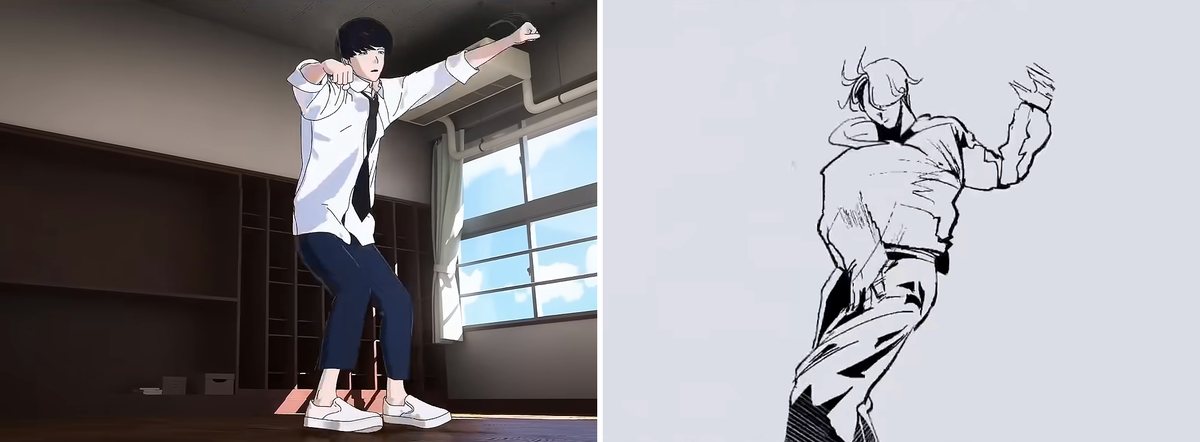
Reviews of the anime point to the same problem. CBR notes that a single dance switches back and forth between hand-drawn animation and 3D, disrupting the flow (CBR, October 2025). AniTrendz puts it more bluntly: the characters’ faces are almost frozen, their eyes have no sparkle, and their mouths look like lines drawn on dolls (AniTrendz, January 2026)。
After watching, I wanted to know how much AI could help now. I split the question into four levels, giving AI more specific information at each level:
- With only music and dance move names, can AI generate a dance on its own?
- With manga panels as keyframes, can AI connect the movements on its own?
- With the creator’s hand-drawn animation, can AI make a character in a color-manga style perform the same dance?
- With the anime itself, can AI fix the uncanny motion capture?
I asked AI to draw the character images in this article based on the official character designs and color manga covers. They are fan-made designs, not official assets.
Before starting, I made another mistake: I identified the wrong character. The anime clip in the Short shows protagonist Kaboku Kotani, but the creator’s hand-drawn dancer is another character, Iori Itsukushima. Because the clips were side by side, I assumed the hand-drawn dancer was Kaboku too. Only after a round of the first three levels did I notice that the clothing and floorwork did not match. Switching to Iori’s official design finally made them line up. So each later level has both Kaboku and Iori versions, and some comparisons show “Kaboku dancing Iori’s dance.”
I tried more than a dozen approaches across the four levels. Here is the conclusion up front: AI produced something at every level, but none of the results looked the way I wanted.
The results first: four levels in one table
The four levels differ in how much information I gave AI. The table shows the best approach and the sticking point for each. Each following section covers one level; the final row is an extra round in which I choreographed a dance instead of following the original.
| Level | What AI received | Best approach | What it achieved | Where it fell short |
|---|---|---|---|---|
| 1 | Music + dance move names | H3 + a beat-by-beat dance move sheet + the original video’s music as input | Danced to the music and performed the major moves on the sheet | It danced “a dance,” but not the one in the original |
| 2 | Manga panels | Redrew 7 keyframes to match the panel camera angles; H3 filled the gaps in one continuous shot | Passed through the poses, with the camera moving along | More keyframes made it look more like posing; I had to invent the timing between panels |
| 3 | Creator’s hand-drawn animation | Line art → 3D mannequin → SCAIL-2 → redraw with Wan | The poses matched the creator’s | The creator’s stepped timing on twos was lost |
| 4 | The anime itself | Anime → 3D mannequin → Wan → timing adjustments | Changed the character and made the pauses clearer | Did not fix the motion capture’s movement arcs; camera angles drifted |
| Extra round | Music + my own storyboard + opening images | H3 generated while listening to the music; for two shots, I used the opening image as the first frame | Changed camera angles according to the storyboard and danced to the music | Reference images appeared in the output; stray objects appeared in empty areas |
Looking at the table as a whole, the more specific the input, the more accurately AI copied it. But level 4 called for changing the movement, not copying it. This time I only got as far as changing the timing.
Level 1: only music and dance move names
With only text and music, AI can dance to the music and produce a decent sequence, but it dances what it imagines, not the sequence in the manga.
The manga does not name the moves. It only gives the dance style, song titles, and narration. For Kaboku’s sequence, I used “HIPHOP, 2Pac’s 〈Changes〉, and the narration ‘hear the sound’” as input. For Iori’s, the manga says HOUSE/BREAK, with narration along the lines of “the head hits the beat,” “all the finer sounds are in the footwork,” and “relaxed, with room to spare.” So the “dance move names” at this level were actually my own descriptions based on the narration.
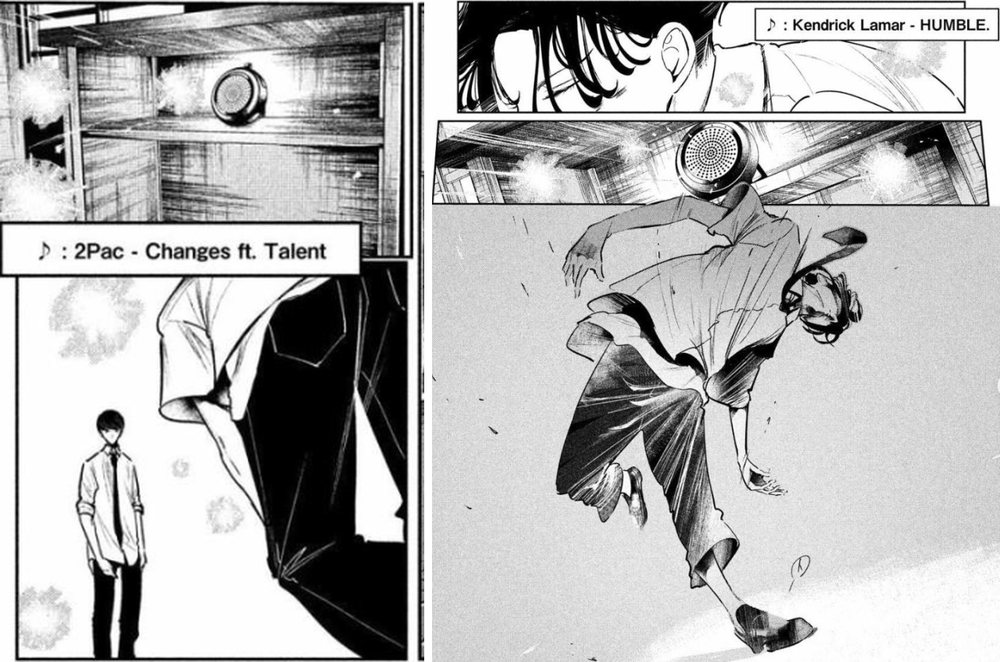
I tried two approaches:
- Grok Imagine with text alone: The character and green screen stayed consistent, but the movement was ordinary rhythmic stepping, without the large, low-to-the-ground moves in the manga
- MiniMax H3 + dance move sheet + original video’s music: I turned the narration into a dance move sheet timed by the second (I made up the move names; they are all guesses), then gave the model the music from the creator’s original video as input
The movements in the H3 set were much larger. I measured squat depth as “height at the lowest point ÷ standing height”: 0.83 for the Grok version versus 0.57 for H3. H3 followed the sheet for the wide-stance downward press, knee lift, side kick, and final deep lunge. All three seeds for Iori produced a handstand freeze.
Giving H3 the original video’s music made the biggest difference at this level. H3’s generated video includes an audio track, and I measured it: 129.2 BPM, the same as the original song. The two tracks’ dynamics also lined up with no time offset. That shows the model did take in the music; I did not separately measure whether the steps landed on the beats.
With only move names and music, AI can listen to the music and perform the big moves you list. It has no way to know what the original dance looks like.
Level 2: give AI manga panels to connect the movements
When I redrew manga panels as keyframes and asked a video model to fill the gaps, AI could connect them. But more keyframes made the result look more like a sequence of poses, and I still had to invent the timing between panels.
First, I used Grok to draw the pose in each panel as a color-manga character, then had H3 pass through those poses in order. I hit a problem: when I used a manga panel directly as a reference image, Grok copied a head partly hidden by a hand as a second head. Three of 9 images were ruined. After I switched to text-only pose descriptions, the second head did not appear again in dozens more images.
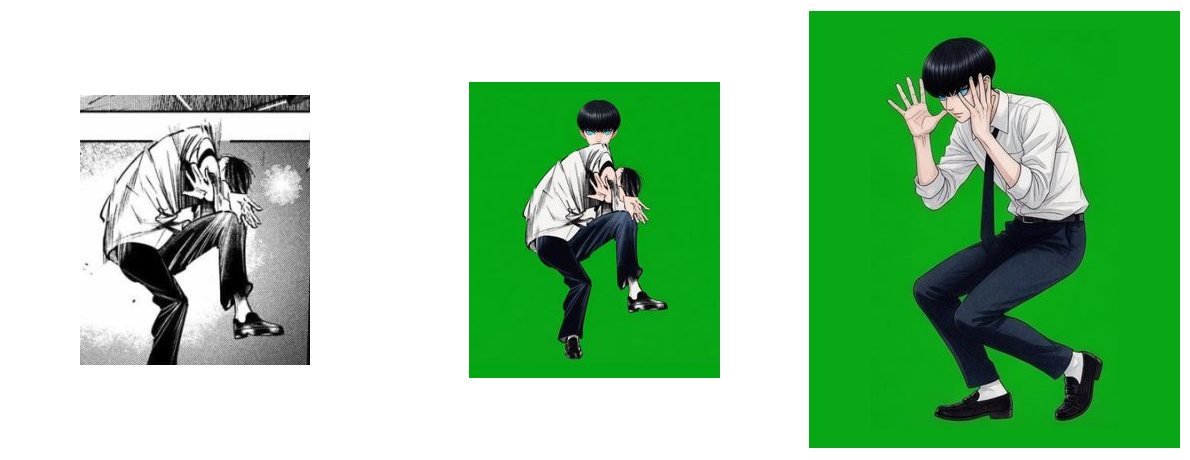
In the first version, I packed the keyframes tightly: one transition pose between each of 9 manga panels, with the key poses held for 3 frames on the beat. This stabilized the background. But the result looked like it was changing poses one image at a time, with jerky motion.
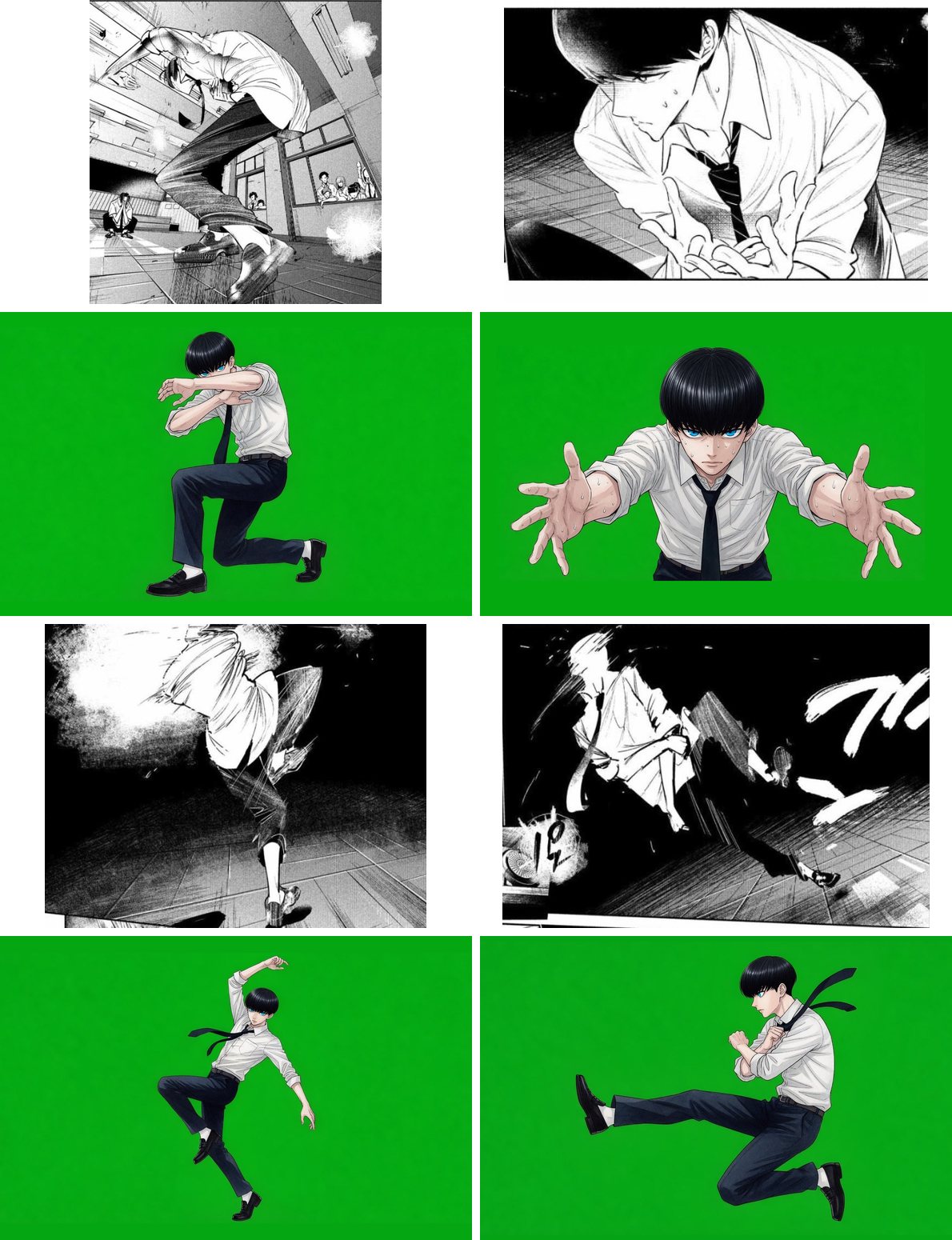
For the second version, I did the opposite. I kept only 7 panels and redrew each at its original camera angle: a low-angle wide shot, a medium shot from the knees up, a close-up of an outstretched hand, and a side-on full-body shot. I added no transition poses and forced no holds. H3 moved the camera and pushed in and pulled back on its own. It took about 16 frames to pull back from the hand close-up to a full-body shot, without a hard cut. The cost was that about a third of the frames were nearly identical to the preceding frame. The video runs at 24 frames per second, but after removing repeated images, there were about 12 distinct images per second. The final lunge also held for 3 seconds, which felt long.
The panels specify poses and camera angles, not how the body moves between poses or how long it takes. AI fills that in itself, and how smoothly it does so depends directly on how closely the keyframes are spaced.
Level 3: with the creator’s drawings, smear frames become extra limbs
The creator’s hand-drawn animation is shot on twos. Fast movements also contain smear frames (several positions drawn in one image to convey speed) and speed lines. The motion transfer model takes all of that literally, producing afterimages and extra limbs.
A motion transfer model takes a character image and a video of someone dancing, then makes that character perform the same dance. In my first version, Wan Animate 2 read the creator’s line art directly. The poses were roughly right, but the face was sometimes strange and some movements were wrong.
I measured the creator’s 26.5-second hand-drawn animation: it has 325 distinct drawings, most held for two frames each (called “shooting on twos” in animation). Fast movements also contain smear frames, with several hand positions in a single drawing. To a person, that conveys speed. To Wan Animate, it looks like there really are several hands in the image.
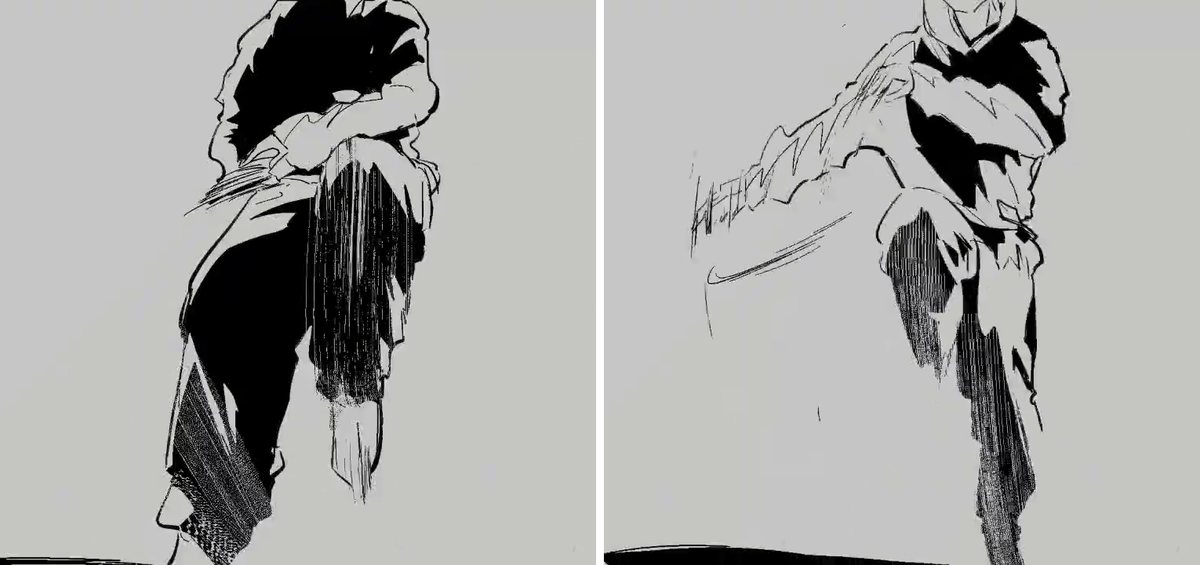
I tried three remedies, each with a different sticking point:
- Extract a skeleton first and give the model only the skeleton: Wan Animate 2 did not handle skeleton images well. The original line art worked best, a skeleton overlaid on the line art came next, and the skeleton alone worked worst: a raised leg turned into standing straight, and floorwork turned into floating while lying down
- Use H3 with skeleton control instead: The movement only roughly followed the source, and the image was very grainy
- Restart each shot from the character image: At the start of every segment, the model first stood in the pose from the character image. In short shots, that standing pose took up the whole segment; adding 1 second of lead-in did not fix it
Next I tried the keyframe approach from level 2: I selected 49 key poses from the creator’s animation, asked Grok to draw them as color-manga panels aligned with the position and size of the creator’s ink lines, then asked H3 to fill the gaps. Each keyframe looked good, but the images warped between them. Around 7.5 seconds, two copies of Iori overlapped. Grok also turned the few frames where the creator pushed in to show only the feet into full-body shots twice. For the same 12-second segment, SCAIL-2 reading the line art directly matched the creator’s motion most closely, though its image was blurry.
The smear frames show several hand positions, so the model draws extra hands. At this point, directly reading the hand-drawn animation was a dead end.
The turning point: converting the motion into a 3D mannequin
When learning motion directly from the image failed, I added an intermediate step: convert the person in the image into a 3D mannequin before passing it to the model.
SAM 3D Body turns the person in an image into a gray 3D body, estimating the whole body’s joint angles for every frame. It infers parts that are offscreen or obscured. I worried it would only recognize photos of real people, but both anime footage and hand-drawn line art worked better than I expected. It captured jumps, floorwork, and handstands in the anime sequence. In the frame where the creator zoomed in to show only the feet, the extracted mannequin had only legs too.
The trouble was in person detection. At first I detected people independently in each frame. As soon as Iori went into a handstand, the detector switched to classmates watching outside the window. Tracking the same person through the entire segment made it stable.
The 3D mannequin serves two purposes: it is the clearest input for the motion transfer model, with a clean body, no smear frames, and no background; and it is the only point in the pipeline where I can edit the movement.
I gave the same mannequin to two models, each with its strengths and weaknesses. Wan Animate produced a more pleasing image with a manga ink-line feel, but a leg sometimes turned translucent. SCAIL-2 matched the motion more accurately, but its style had a realistic, smeared look and a blurry face. My final approach was a relay: SCAIL-2 drew from the mannequin first, then Wan redrew SCAIL’s output. The poses came from SCAIL, the brushwork from Wan.
The full version’s poses matched the creator’s. I took 14 frames and compared them side by side, by eye, with the original drawings at the same moments. Every pose matched, including the handstand and the final fall. This was a visual check, not a programmatic measurement. Two things differed from the creator’s work: this version moved continuously through points where the creator cut to a new camera angle, and it smoothed out the stepped timing of the animation on twos. I did not trace exactly which step removed those pauses. The mannequin’s motion was already smooth, making it the most likely cause.
Level 4: give AI the anime itself and fix the motion capture
Motion transfer models only copy. If I feed one the anime clip directly, the uncanny feel stays intact. To fix it, I have to edit the 3D mannequin.
My first two attempts worked at the image level: I had Wan Animate 2 read the anime clip faithfully, then tried changing the anime’s timing before feeding it in. The faithful version carried over the movement and its uncanny feel. In the retimed Kaboku version, I inserted 4 holds, but could measure only 1 in the generated result; the model smoothed away the others. SCAIL-2 reading the anime directly had another problem: it drew the classroom and the classmates watching outside the window into the background.
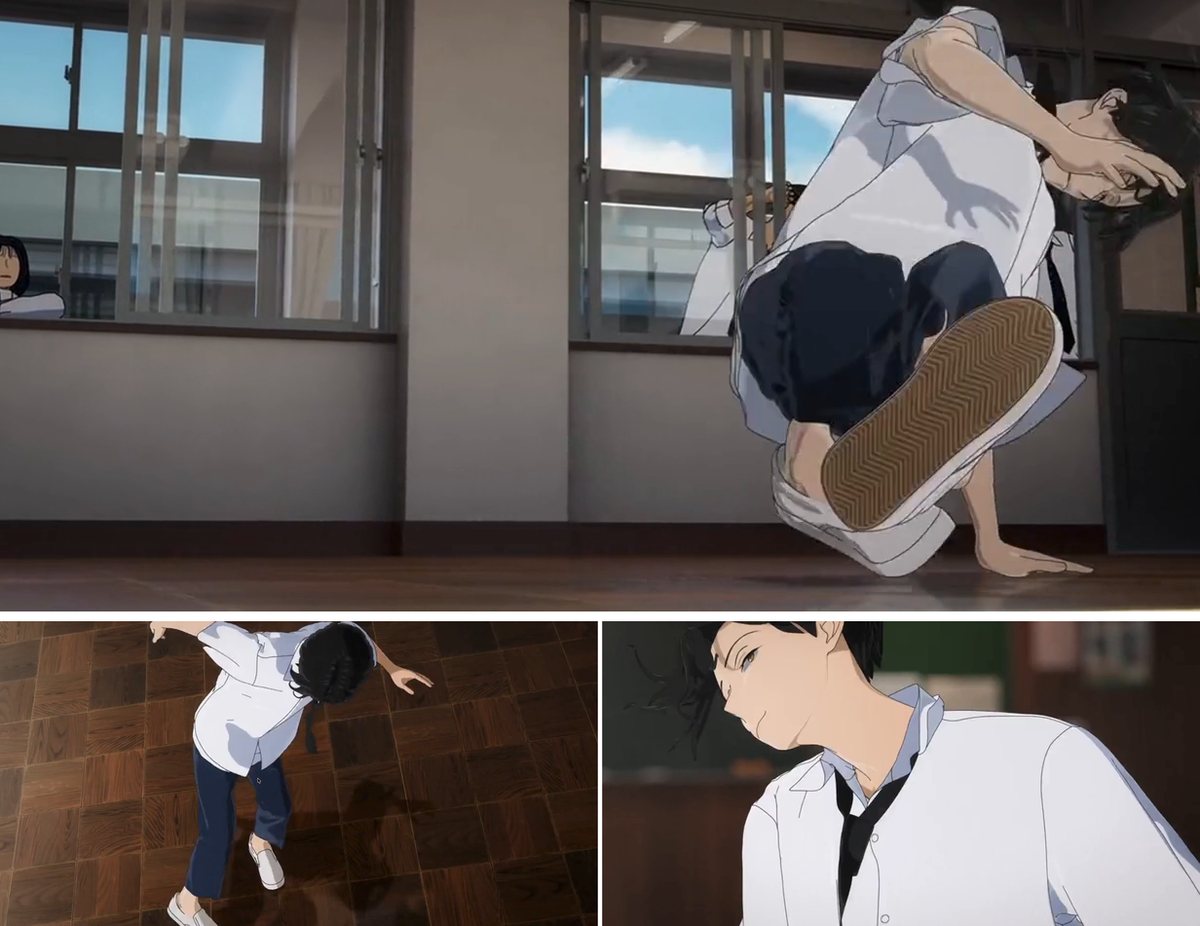
After switching to a 3D mannequin, I changed only its timing. I used a new drawing every two frames, or about 12 per second. At the apex of a movement, I held the pose for two extra frames in 28 places across the 14.8-second test segment. I then removed the added frames from the fastest moments of movement, keeping the total length unchanged and the dance aligned with the original music.
The pauses became clearer, but the arcs of the leg lift and turn were still the motion capture arcs. Take a kick: after retiming, the leg stays at its highest point for two more frames, but it still follows the path of the motion capture performer on the way up. Hand-drawn animation often first pulls back in the opposite direction before a big move, and exaggerates the pose at its peak beyond what a real person can do. Both would require editing the mannequin’s joint data directly. I did not do that this time.
The full version had another problem. I let Wan draw continuously from beginning to end, so the previous shot’s camera angle carried over into the next. An original overhead shot became a closer shot, while an original close-up of just the head pulled back to show the full body. The motion itself was right, but the camera angles drifted.
I can fix timing on the mannequin. The other half of making motion capture feel less like motion capture lies in movement arcs and poses, which I did not edit this time.
Extra round: choreograph my own dance and give the same storyboard to three models
In level 1, I let AI improvise to the music. In levels 2–4, it copied the manga, hand-drawn animation, or anime. For the final round, I changed the test: I choreographed my own 26.5-second street dance without following any original, specified the camera angles, moves, and cut points in advance in a storyboard, and gave that same storyboard to Grok Imagine, MiniMax H3, and Seedance 2.5 to see how much each could follow.
I reused the song from the creator’s hand-drawn animation, measured at 129.2 BPM. The drums enter at 2.32 seconds, a cymbal hits at 9.78 seconds, and the energy drops at 24.6 seconds. I split the sequence into 5 shots averaging 5.3 seconds each, with every cut on the first beat of a bar. I picked several common street dance moves, using dancers’ usual terms: a chest pop is a quick forward thrust of the chest, toprock is footwork performed standing up, and a six-step circles the legs around the body while the hands support it on the floor. Each shot uses a different camera angle:
| Shot | Time (seconds) | Camera angle | Move |
|---|---|---|---|
| 1 | 0–4.2 | Full body, front view, fixed camera | Nod to the beat; chest pop when the drums enter, then two-step |
| 2 | 4.2–9.8 | Waist-up, three-quarter front view, slow push-in | Repeated chest pop, arm wave, and body roll, then point at the camera |
| 3 | 9.8–15.3 | Full body, low angle, orbiting camera | Jump and land on the cymbal hit, Running Man, Roger Rabbit, then one full turn |
| 4 | 15.3–20.9 | Full body, overhead view | toprock, drop to the floor, six-step |
| 5 | 20.9–26.5 | Knees-up, low angle, push-in | Spin up from the floor, two arm hits, then cross arms and freeze from 24.6 seconds to the end |
I switched the character to Iori. I asked GPT to use two color-manga covers to draw a character image, four views, and detail images. I changed the background to a completely empty white space, then drew 5 opening images for all three models to use. The storyboard, music, and opening images were the same, but each model received them differently, as I explain below. What I really compared was three methods, not just three models.
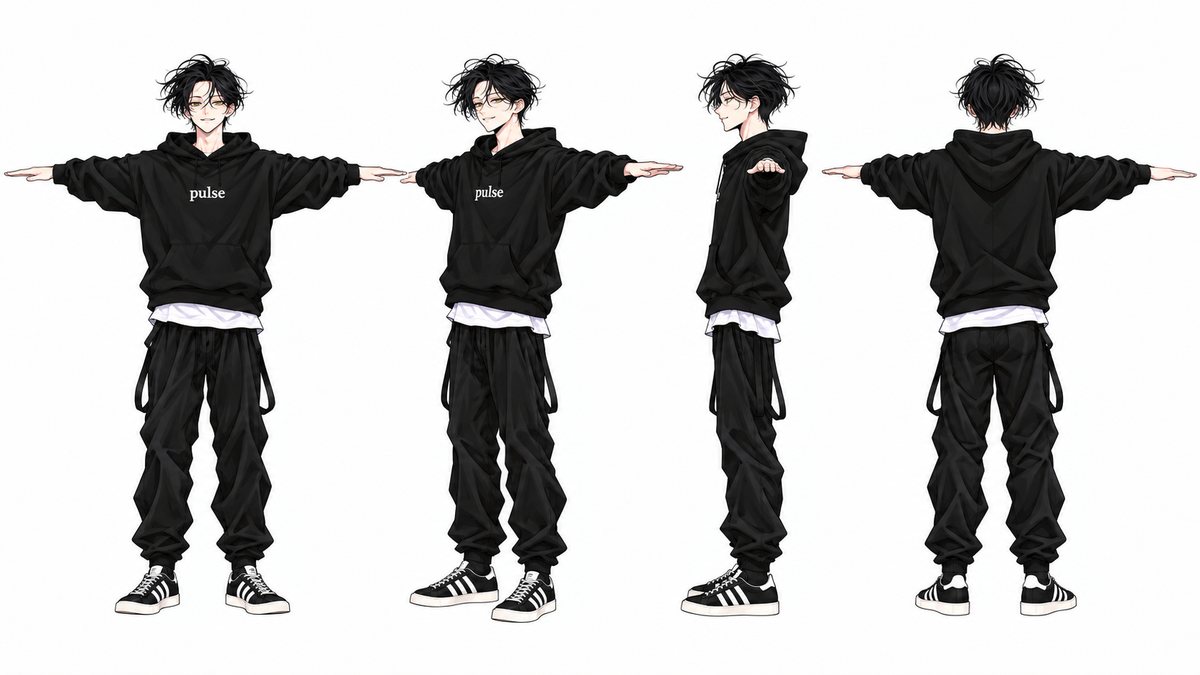
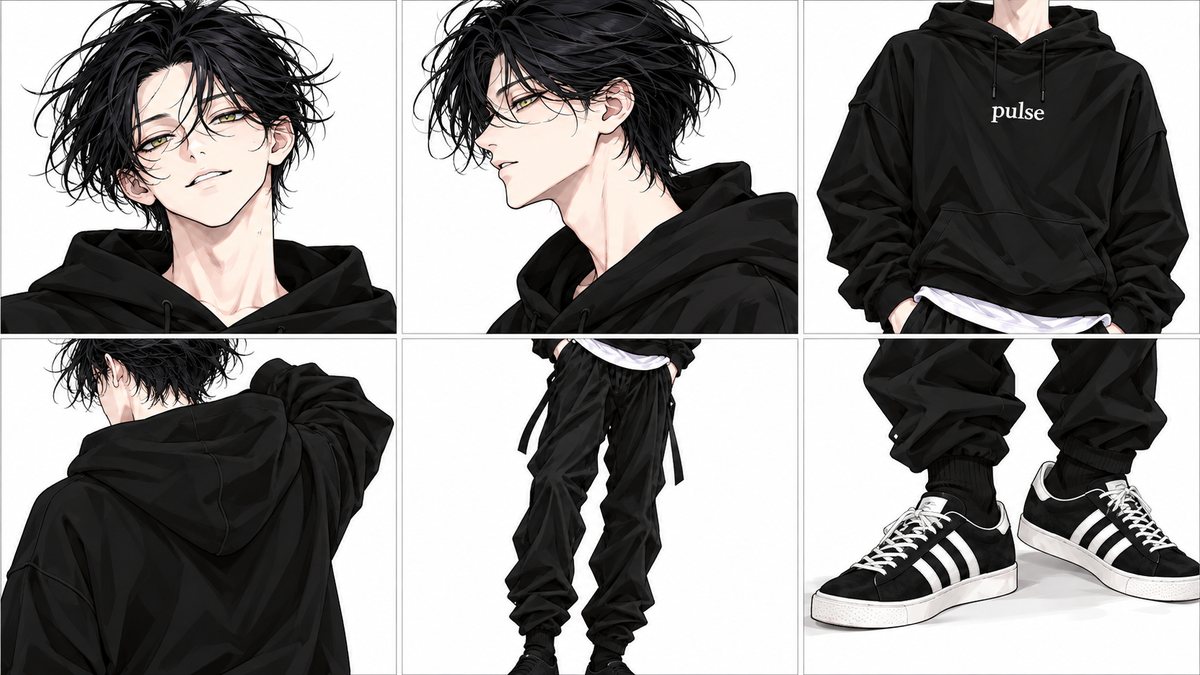
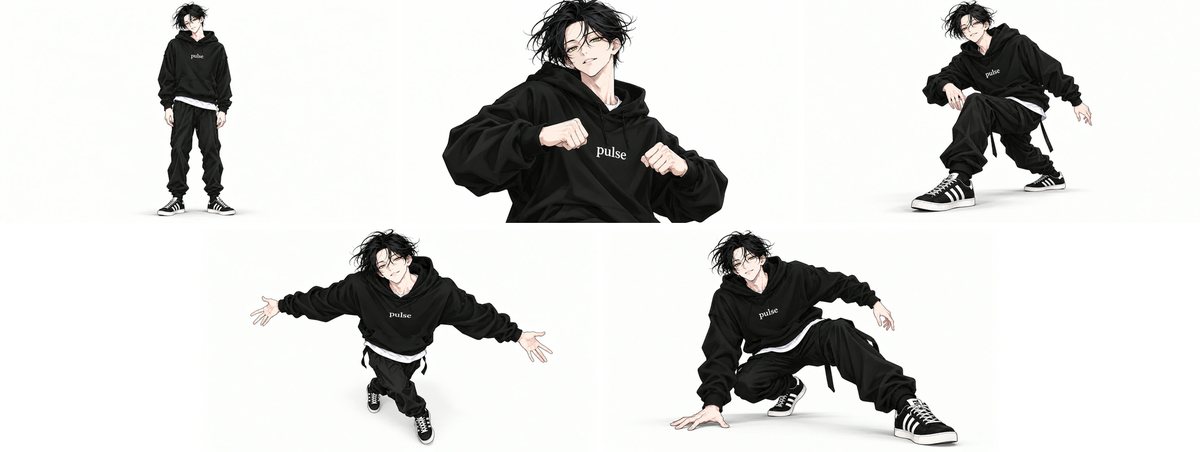
Each of the three models had one clear strength and one clear problem:
- Grok Imagine It used the opening image directly as the first frame, so its composition stayed closest to that image. It could not hear the music while generating; I laid the music over it after editing. Halfway through the waist-up shot, the camera pulled back on its own to show the full body. In the Running Man and six-step shots, the movements were limp, as if the character were doing physical therapy
- MiniMax H3 It received the character image, face close-up, opening image, and music for each shot at the same time. It danced to the music and held the camera angle most consistently. Its problem was drawing reference images into the scene: the four-view sheet became translucent copies on either side of the character, and the opening image remained as an afterimage. The results were clean only after I removed the four-view sheet and used the opening image directly as the first frame for two shots
- Seedance 2.5 It also listened to the music, and its movements were the largest of the three. It would not let me use both “pin the opening image as the first frame” and “reference music” at once. I chose the music, so the opening image could only be a reference. The pure white background did not hold: one shot became a light gray room with shadows in the corners. In the first round, it also drew an arm wave as an arm trailing a glowing streak
What worked, and what is still missing
As of October 2026, my test results are:
- What worked: dancing to music; connecting key poses into a sequence while moving the camera; transferring a dance to another character; extracting a 3D mannequin from anime frames and hand-drawn line art; relaying between two models to get part of each one’s strengths; switching camera angles according to a storyboard
- What did not work: reproducing the original dance from names and music; preserving the stepped timing of hand-drawn animation; keeping each shot’s camera angle while drawing continuously across shots; following the specified angle in every shot; using a reference image only as a reference without drawing it into the scene
- What I have not tried: editing the mannequin’s joint data directly to make motion capture arcs look hand-drawn
- Cost: the full versions of levels 3 and 4 total 71.5 seconds of video and took about 8 hours on one RTX 3090, roughly a full workday
My clearest takeaway is the order of operations: first convert the movement into a 3D mannequin, then let the model change the character. To fix the movement, edit the mannequin.
Copy this for your AI Agent
Paste the following into your AI so it can assess your dance video and character image.
Further reading
| Resource | Why it matters |
|---|---|
| Hinata, “《絕妙舞步》 Becomes 《絕望舞步》” (YouTube Short) | The starting point for this article: the anime’s motion-captured dance beside the creator’s hand-drawn version, with the difference immediately visible |
| Coffee’s original hand-drawn animation post (X) | The original used for comparison in level 3; its animation on twos and smear frames are both visible here |
| CBR, October 2025 | Notes how switching between hand-drawn animation and 3D within the same dance breaks its flow |
| AniTrendz, January 2026 | Notes that the 3D characters’ faces are almost frozen and their eyes lack sparkle |
Music and image rights
The screenshots, clips, and music in this article belong to their respective rights holders. I quote them here only to explain the test results. If a rights holder would like them removed, please let me know in a comment.
| Type | Work and rights holder | Where used |
|---|---|---|
| Music | Jazztronik〈Samurai〉 | Music from the second hand-drawn animation by creator Coffee. It is the audio track in the four level 3 videos, the level 2 version with moving camera angles, and the extra three-model comparison. The two H3 videos in level 1 and the two densely spaced keyframe videos in level 2 used it as generation input; their audio tracks were generated by H3 from it |
| Hand-drawn animation | Coffee (X: @ccffeee) | Motion source for level 3; the original is played only through the official X embed, without conversion or saving a separate copy |
| TV anime | Wandance Episode 5 ©珈琲・講談社/ワンダンス製作委員会 | Source of the level 4 screenshots, motion, and side-by-side original clip; the full level 4 version uses the audio from this original sequence |
| Manga | Coffee, Wandance, Chapter 7 (Kodansha) | Manga panel screenshots for levels 1 and 2 |
| YouTube Short | Hinata, “《絕妙舞步》 Becomes 《絕望舞步》” | Screenshot in the “Where it started” section |