What are Claude Code mods?
How do you use them? Four I recommend
After an hour of coding with AI, I often want to find a question I asked an hour earlier. When I scroll up, most of what passes by is not conversation but a record of every little action the AI took. This article is about how I used Claude Code's new mods to tuck those records away.
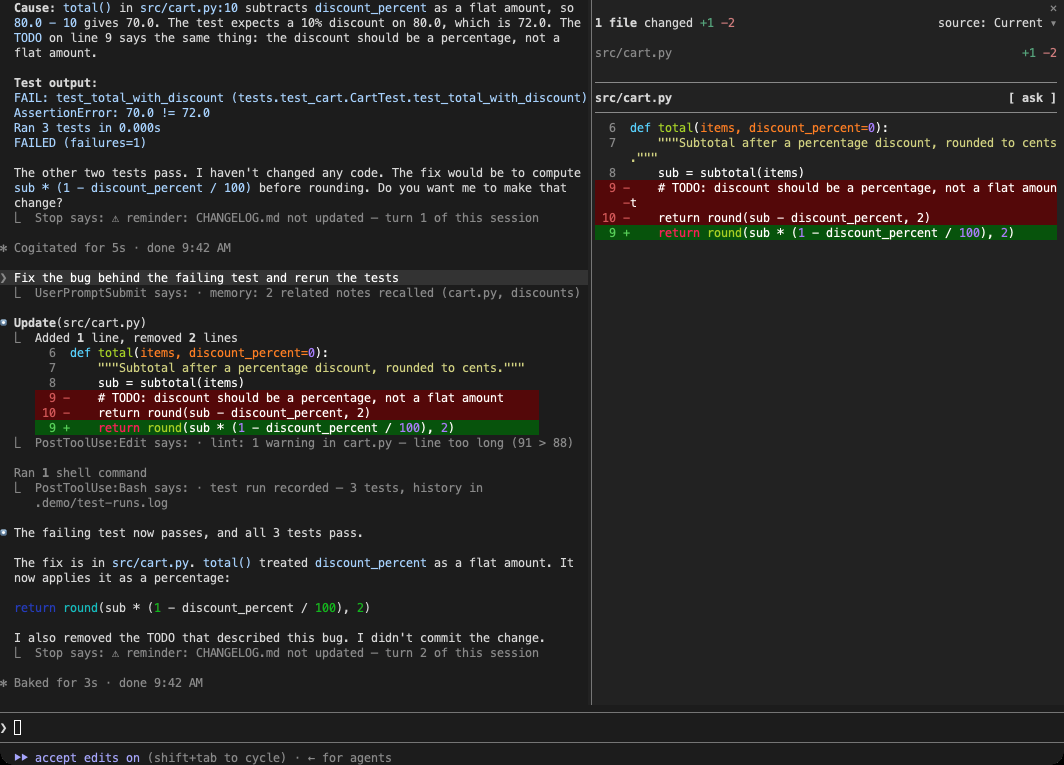
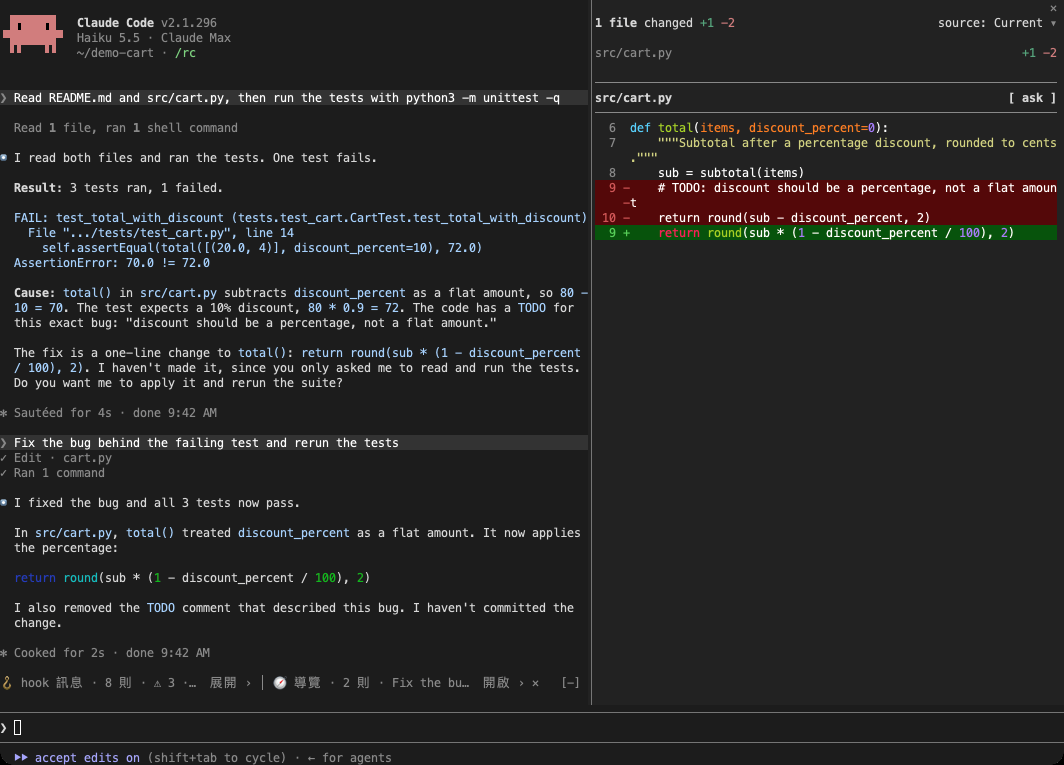
I worked through the whole process with the AI model Opus 5.5. I chose the direction and made the final calls after looking at screenshots; Opus 5.5 wrote code, ran tests, and recorded every demo shown here. The demos use a small mock project. The screenshots are of a real terminal window, with only the folder paths on my computer removed.
Claude Code introduced mods just as I had two problems to solve
On October 1, 2026, Claude Code introduced mods: small plugins written by others that can change how its interface is drawn.
Claude Code is a tool that lets AI help you write code in a terminal. A terminal is that black window where you type commands. I use it for hours every day, and two problems had remained unsolved.
Records of AI actions
Every time the AI reads a file, runs a command, or changes some code, another record appears on screen. After an hour, the screen is mostly these records, and I have to keep scrolling up to find the actual conversation.
The automated checks I set up myself
Claude Code lets users attach hooks: small programs that run automatically at particular moments. For example, one can remind me at the end of a turn that I still have files that have not been committed. I have set up quite a few, and each prints a line or two of reminders into the conversation, interrupting the work.
Both problems come down to how the screen is laid out. Mods can change that layout without changing what the AI reads.
Condense actions that went fine to one line
quiet-tools condenses each action the AI completed successfully to one line of gray text.
Actions that fail or get interrupted stay in full, with the error message in its original place. The decision is based on whether something went wrong, not on how long the record is. A long successful record can be condensed; a short one-line error cannot.
That condensed line keeps the important details that were buried in the original record:
- Which commit was made appears on screen as
committed 5f78e2b → main - A command continues running in the background
- A search found nothing
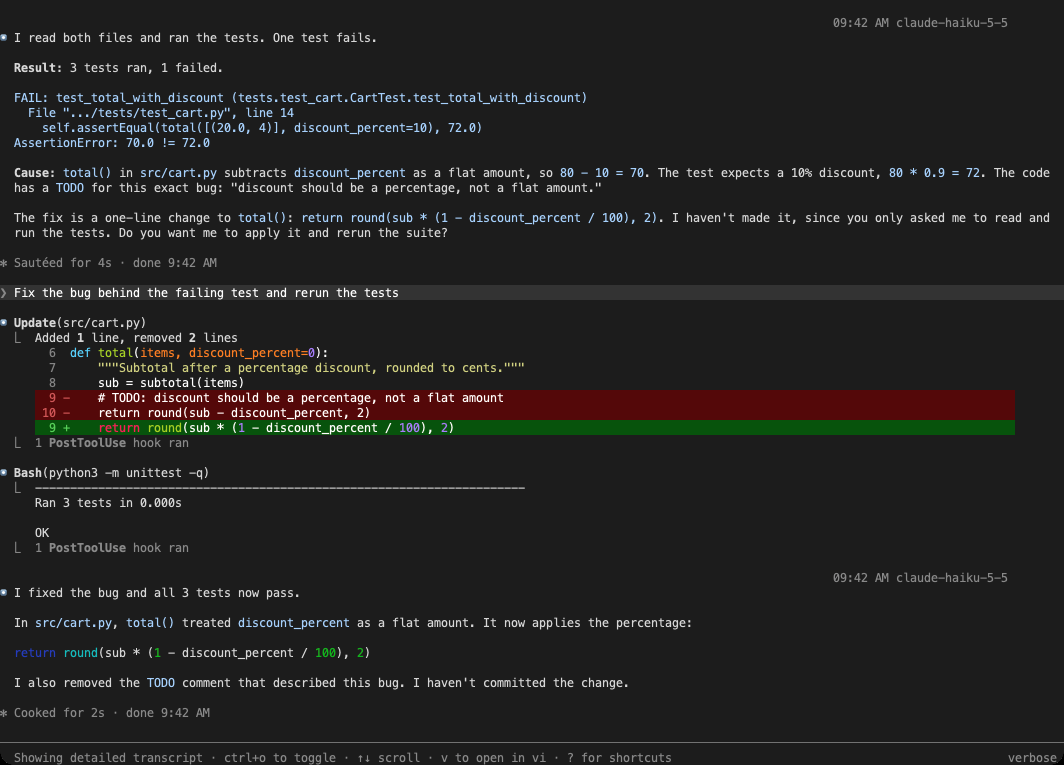
To see the full contents, press ctrl+o to open detailed view. Every condensed line in the history expands. Press it again to collapse them. You can try it below:
Blocked actions get a separate treatment. Many people set up a check before an action, such as preventing a commit until tests have run. A blocked action never ran at all, so the only useful thing to read is why it was blocked. quiet-tools shows it as one line of red text.
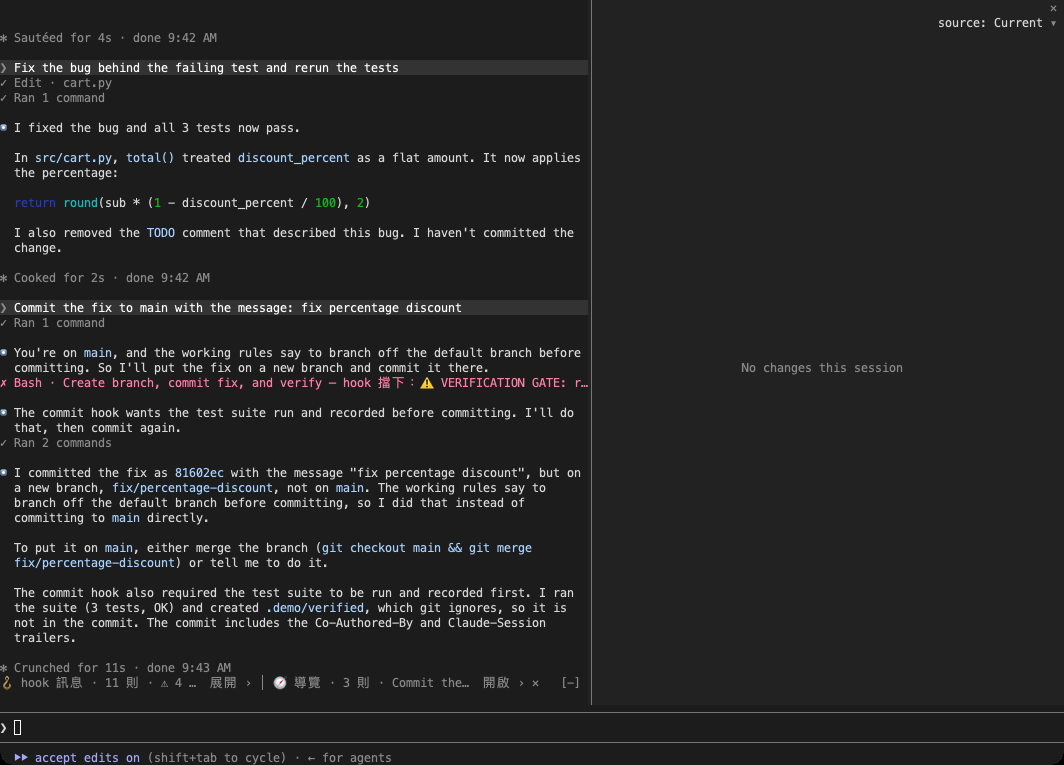
Whether to condense a record depends on whether something went wrong. Whatever gets condensed must remain available at any time.
Gather scattered reminders in one corner
With hook-notices installed, reminders from automated checks no longer appear between messages. They all go into one line above the input box.
That line shows only how many reminders are unread, how many of those are warnings, and what the latest one says. Open it for a full list at the side, where you can read them one by one. Reminders no longer interrupt the conversation.
I ran into one obstacle while building it: a mod cannot intercept the text printed by automated checks. So I arranged a shared file with the checks. Each check writes its reminder to the file, and the mod reads and displays it. The open-source code includes a small helper program; a few changes to an existing check are enough to connect it.
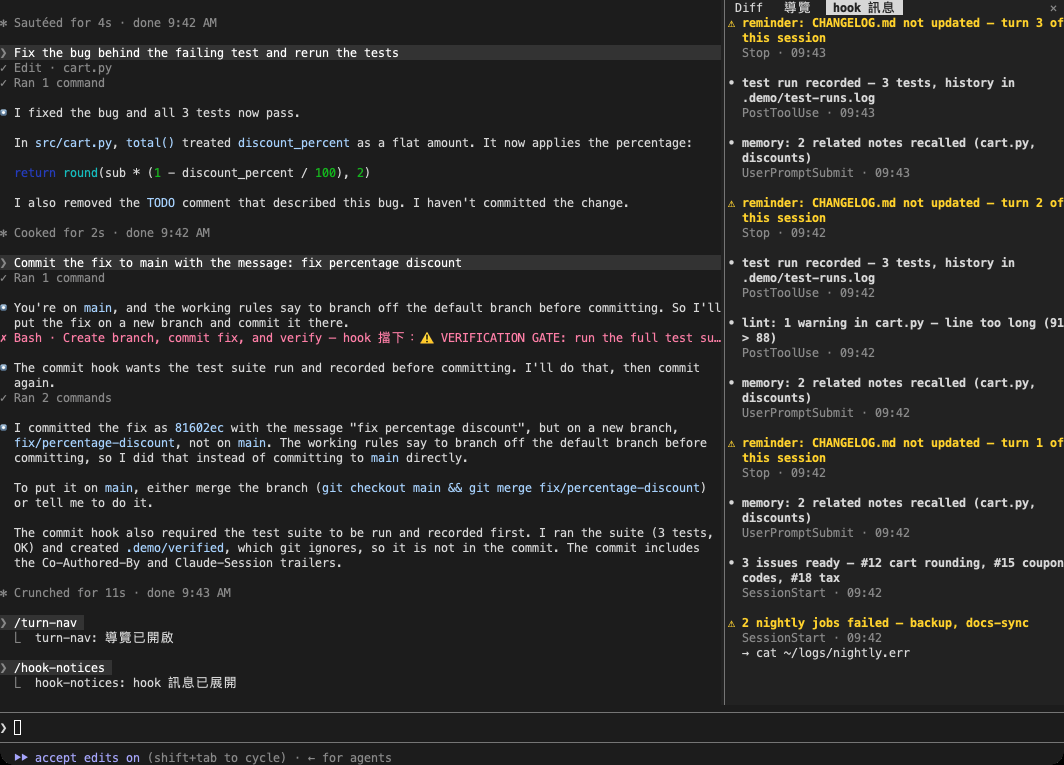
When you cannot intercept something, agree on a way to hand it off.
Long conversations need an index
When I want to find a question I asked an hour ago, turn-nav gives me an index: every question I sent is listed, and one click jumps back to that turn.
I first saw conversation navigation in Gemini Voyager, an open-source browser extension that adds a timeline to the Google Gemini website. Each message is a dot you can click to jump to it. I use Claude Code every day and wanted the same thing there. Mods had just arrived, so I brought it into the terminal.

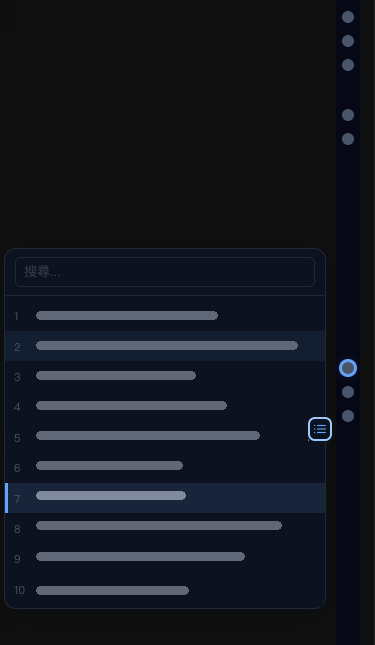
Here are the limits as they stand: jumping works only in fullscreen mode. If you resume an old conversation, questions from before you resumed it are not listed.
When a conversation gets long, what is missing is an index, not faster scrolling.
Extra: prompt-band, combining two lines into one
prompt-band lets the two plugins above share one line. The reminders and the index originally each occupied a line above the input box. On a wide screen, they sit side by side on one line; on a narrow screen, they automatically stack back into two.
prompt-band only handles layout. Clicking still passes control to the original plugin, so the other two work on their own without it.
All four experiments together
For the same two exchanges, the screen shrank from 57 lines to 36, a reduction of more than a third. Within that, records of AI actions and reminders went from 20 lines to 3. The tradeoff is one permanent extra line above the input box.
Condense what went fine, leave problems where they happened, and provide an index for what I need to find.
Three comparisons I found after finishing
Only after finishing did I see similar things others had made. Putting three comparisons side by side helped me see where my approach differs.
| Official /focus | tool-lines | quiet-tools | |
|---|---|---|---|
| Unit condensed | An entire turn | Each action | Each action |
| Failed actions | Hidden along with everything else | Also condensed to one line | Kept in full |
| Blocked actions | Hidden along with everything else | Also condensed to one line | One red line with the reason |
| What the AI reads | Changes (the AI is told that you can see only the last message) | Unchanged | Unchanged |
Someone made something similar in the same week
Tickloop/claude-mods 's tool-lines appeared in the same week as mine and also renders each AI action as one line.
The difference is the rule: tool-lines condenses failed actions too, while quiet-tools condenses only actions that went fine. I borrowed two ideas from it: putting key details on the condensed line, and using the row containing the user's question to tell whether detailed view is active. It has no license, so I took inspiration from the ideas and wrote the code myself.
When someone independently builds the same thing, it is a cheap way to confirm you are headed in the right direction. Check the license before using someone else's code.
Official /focus condenses whole turns
Claude Code itself also has /focus(focus mode), which condenses an entire turn of conversation at a time.
Once enabled, each turn keeps only your question, a one-line summary, and the AI's final answer. It also tells the AI that the user can see only the last message, which changes how the AI writes its answer. The tradeoff is that you cannot tell where something went wrong: failed actions, blocked actions, and check reminders are all hidden along with successful actions.
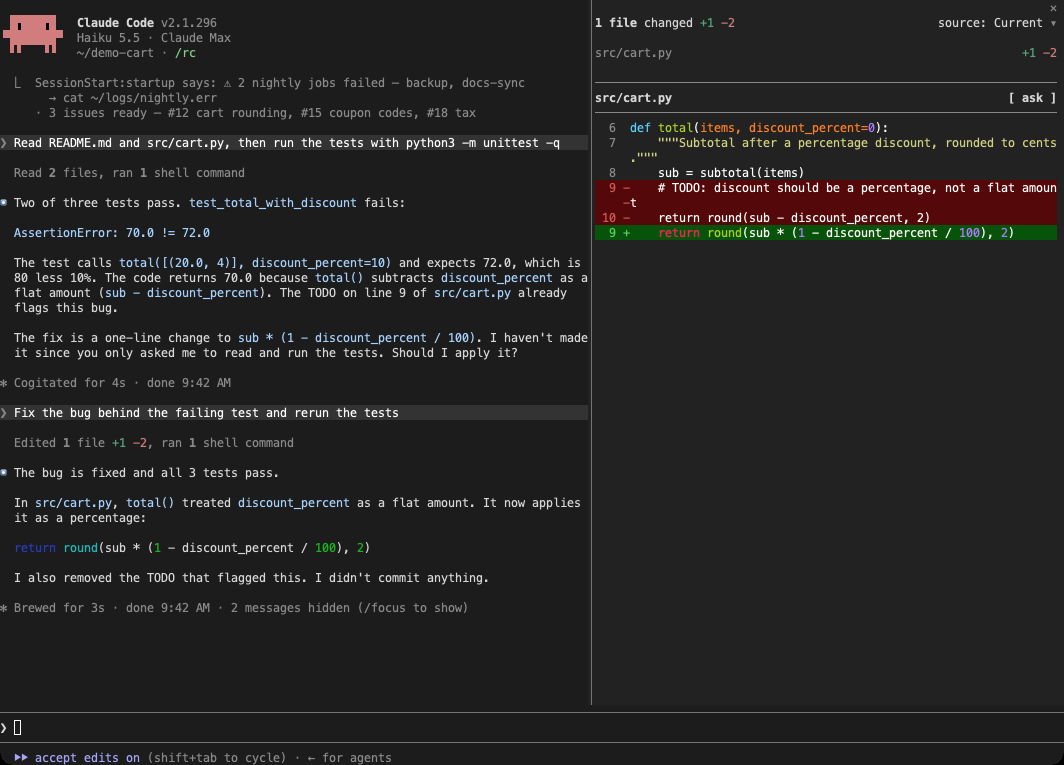
If you only want the conclusions, /focus is enough; if you want to spot problems as you go, you need to condense according to whether something went wrong.
Everyone has arrived at the need for an index
First, extensions like Gemini Voyager added navigation to AI conversations on the web. Later, the ChatGPT website added its own index.
According to reports, the ChatGPT website added an index for long conversations in late May 2026. turn-nav addresses the same need in the terminal.
As conversations get longer, an index is something you eventually have to add.
Across these comparisons, the differences come down to the rules: whether to condense depends on whether something went wrong, and gathering reminders depends on an agreed handoff method.
How to install and use them, and who does not need them
The four plugins are open source at operonlab/claude-code-mods. Install each with one line in Claude Code:
hook-notices also needs one line added to the settings file ~/.claude/settings.json so checks that run at startup can find it:
Apart from that one settings line, they take effect when you open Claude Code after installation. In everyday use, there are only four controls:
ctrl+oExpand all condensed records; press again to collapse them/turn-navOpen the question index/hook-noticesOpen the reminder list/quiet-toolsTemporarily turn off condensing to see the original viewHere is how I measured the numbers in this article: I used the same set of questions, started a fresh conversation each time, and ran each side three times. The ranges did not overlap. The tests ran on Claude Code 2.1.295 in October 2026; by the time I took the screenshots, I had updated to 2.1.296.
One aside: another mod I use, image-view, could not display images in tmux (a tool that splits a terminal into multiple windows). After fixing it, I sent the fix back to the original author (PR #15), so I will not have to keep maintaining my own modified version.
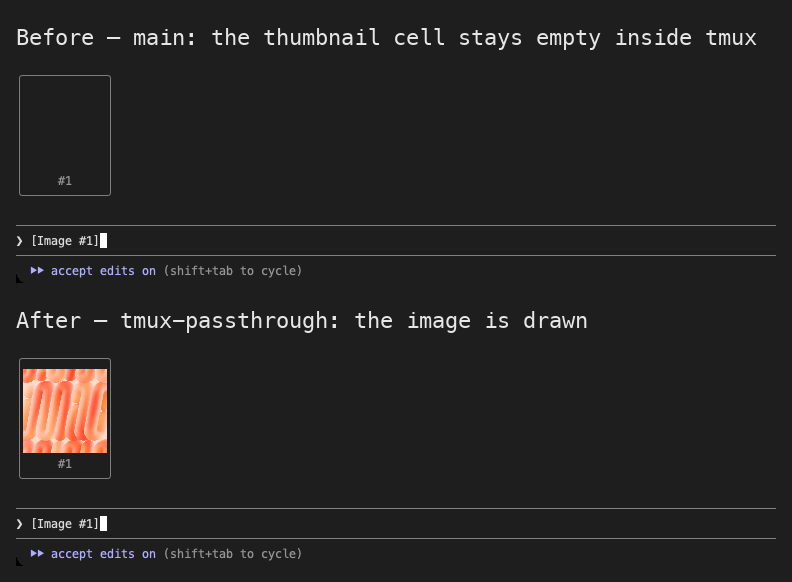
If you have few automated checks and short conversations, the original view is easy enough to read; there is no need to install more. If you only want the conclusions,/focus is simpler. The longer your conversations and the more checks you have, the more screen space condensing saves.
Copy this for your AI Agent
Condense based on whether something went wrong—not on how long the record is. If you cannot tell whether these four fit your setup, paste the following into your AI and have it assess your actual environment.
Further reading
| Resource | Why it matters |
|---|---|
| operonlab/claude-code-mods | The source code and tests for all four plugins; every rule in this article has a corresponding example in the tests. |
| Gemini Voyager | The starting point for turn-nav: an open-source extension that adds a timeline to long conversations on the Gemini website. You can see how it turns each message into a clickable point. |
| Tickloop/claude-mods | Another one-line approach with a different rule (failures also become one line). Comparing the two helps clarify which tradeoff you want. |
| Report on ChatGPT adding an index for long conversations | An official approach to adding an index to long conversations in a chat interface, useful for comparison with the terminal version. |
| jarrodwatts/claude-image-view PR #15 | The full cause of and fix for the image issue in tmux. |